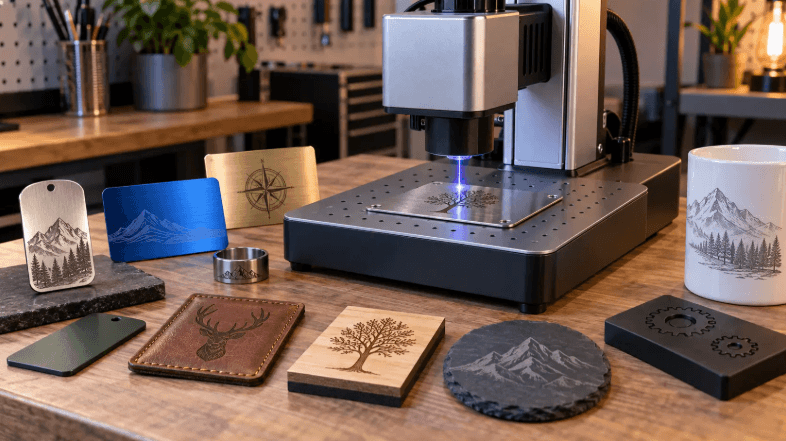

If you’re shopping for a laser in Canada, you’ll hear confident opinions on both sides. The truth is that neither a CO2 laser engraver nor a fiber laser is universally better. They work on different materials and serve different businesses. Being in Canada doesn’t change that, though it does affect shipping, duties, and local support. This guide explains the technical differences first and then the practical Canadian considerations.
CO2 Laser Engravers: What They Do Best
CO2 lasers are the most versatile choice for hobbyists, makers and small businesses starting with signage, crafts or custom gifts. They are best for non-metals such as wood, acrylic, leather, paper, glass, rubber, and fabric. They can also mark pre-coated metals, but they can’t engrave bare metal directly.
Strengths:
- Cut and engrave thick or organic materials well
- Handle a huge range of products, from cake toppers to plywood signs
- Generally lower entry cost than fiber systems
Drawbacks: The laser tube is a consumable part. Glass tubes have a limited lifespan, commonly cited as roughly 1,000 to 8,000 hours depending on quality, and the system needs proper water cooling and periodic alignment.
Fiber Lasers: What They Do Best
Fiber lasers are specialists for metal. They are best for bare metals such as stainless steel, brass, aluminum, and titanium, plus slate and certain hard plastics.
Strengths:
- High-precision marking, etching, and deep engraving on metal, for items like tools, jewelry, QR codes, and metal business cards
- Very fast and accurate, often built around galvo mirror systems
- Low maintenance, with lifespans commonly cited in the tens of thousands of hours and no tube replacement
Drawbacks: A higher initial cost and narrow material compatibility. A fiber laser can’t cut or engrave wood, acrylic or other organic materials.
The Deciding Question: What Will You Make?
Your product list decides the machine.
- If you want to make signs, cake toppers, leather goods, or cut plywood and acrylic, you need a CO2 laser.
- If you’re marking serial numbers, knives, firearm parts, jewelry, or metal components, you need a fiber laser.
A simple test is to write down the ten products you’d like to sell first. If most are wood, acrylic, or leather, choose CO2. If most are metal, choose fiber. If the list is truly mixed, start with the technology that matches the best-selling product and expand later.
Considerations That Are Specific to Canada
- Shipping and duties. Ordering heavy machinery from overseas or from the United States involves freight, border brokerage, and possible duties. These costs can change the real price of a machine significantly, so compare delivered, all-in prices rather than the sticker price.
- Local stock and warranty. Some Canadian distributors and North American brands hold local stock or provide local warranty support. Before buying, check whether the supplier ships from inside Canada, who handles warranty claims, and how long replacement parts take to arrive. A cheaper machine that takes weeks to repair can cost more in lost orders than a slightly dearer one with local support.
- Climate and workspace. Canadian winters matter for CO2 lasers. Water-cooled systems need to be kept above freezing, so an unheated garage or shed needs a plan, such as a heated space or appropriate coolant. Always follow the manufacturer’s guidance.
- Ventilation. Smoke and fumes need to be vented outside or filtered, particularly in colder months when windows are closed.
A Closer Look at One Canadian Option
For makers who want a CO2 machine that suits craft and small-business work, the OMTech Polar 50W desktop laser cutter and engraver with rotary is a good example of what to look for. It’s listed at CA$2,199.99 on OMTech’s Canadian site and includes two rotary axes, which let you engrave round items such as tumblers, glasses, and bottles as well as flat material.
Why that matters for a business:
- Wide product range. Flat work such as signs, coasters and gifts, plus cylindrical items using the rotary attachments.
- Desktop footprint. It fits a home studio, a spare room or a small workshop.
- Enclosed design. It’s easier to manage dust and smoke and safer around the household than an open-frame machine.
At the time of writing, the listing showed as sold out, so check availability and lead times on the product page before you plan around it. Also check the current specifications, working area, and included accessories. Keep in mind that CO2 machines don’t mark bare metal directly. If you want to engrave stainless tumblers, you’ll need a coated tumbler, a marking compound, or a fiber laser.
See also: Business Strategies for Competitive Markets
What About Running Costs?
Running costs differ between the two technologies. A CO2 laser needs periodic tube replacement, clean coolant, and occasional new lenses and mirrors. A fiber laser has few consumables, which lowers its cost per hour, but that advantage only matters if your product mix genuinely needs metal marking. A cheaper-to-run machine that can’t make your best-selling products isn’t a saving. Compare total cost of ownership over two to three years, including cooling, ventilation, spare parts and your own downtime.
Who Should Consider Both?
Some Canadian shops eventually run both technologies: CO2 for signs, gifts and wood, and fiber for metal tags and serial numbers. That’s a reasonable second step once one product line is paying for itself. Starting with both rarely makes sense unless customers are already waiting for each.
A Quick Comparison
| CO2 laser | Fiber laser | |
| Materials | Wood, acrylic, leather, paper, glass, rubber, fabric | Bare metals, slate, some hard plastics |
| Metal | Only coated metal, or with marking compound | Direct marking and engraving |
| Upfront cost | Lower | Higher |
| Maintenance | Tube, cooling, alignment | Minimal |
| Best for | Signs, gifts, crafts, wood and acrylic | Tools, jewelry, serial marking |
Buying Checklist for Canadian Makers
- List your first products and match them to materials.
- Check the delivered price, including freight, duties, and taxes.
- Confirm local support and warranty terms.
- Plan the workspace, including ventilation, power, and winter temperatures.
- Check software compatibility, such as LightBurn.
- Budget for consumables like lenses, replacement parts and materials.
The Bottom Line
Neither laser wins in every situation. CO2 is the practical choice for most Canadian makers starting with wood, acrylic, and leather. Fiber is the right tool if your business is built on metal. Decide by material, compare total delivered cost and support, and choose a machine that fits your workspace and your first product line.

 By
By